
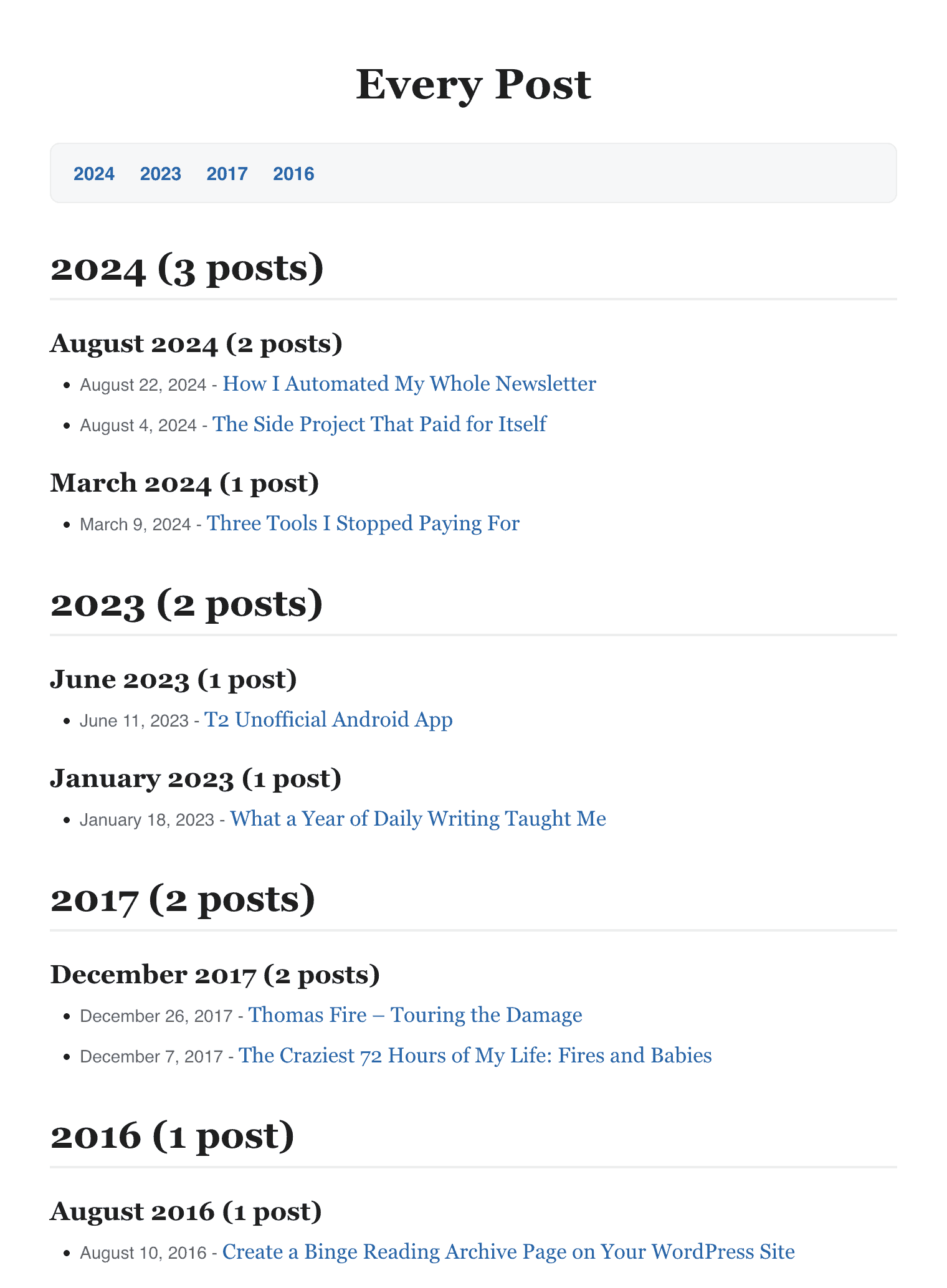
Binge Reading Archive Page is a free WordPress plugin that lists every post on your site by month, so readers can scroll your whole history and read straight through. You add one shortcode, [binge_archive], to any page, and you get the archive with no other setup. You can use it with any theme, and your existing fonts and colors carry over, so nothing looks bolted on.
Get it free on the WordPress.org plugin directory, or browse the source on GitHub.
What the plugin does
- Groups your published posts by month, with optional year headings
- Sorts newest first or oldest first
- Works with any public post type, including posts, pages, and custom types
- Filters by category from the settings page or right in the shortcode
- Adds optional post counts next to each heading, like “August 2026 (12 posts)”
- Adds an optional jump-to-year navigation list for long archives
- Shows or hides post dates, with your own date format and separator
- Caches the output for fast page loads, and the cache works with Redis and Memcached
- Uses your theme’s styling, so there’s nothing extra to design
How to use it
- Install and activate the plugin from your WordPress dashboard, or download it from the WordPress.org plugin directory.
- Create a new page and give it a title like “Archive” or “Start Here”.
- Add the shortcode
[binge_archive]and publish.
That’s the whole setup. Want more control? Each placement can override your saved settings:
[binge_archive]
[binge_archive category="news"]
[binge_archive post_type="page" order="ASC"]
Settings you can change
Visit Settings → Binge Reading Archive after activating. You can pick the post type and sort order, turn year and month headings on or off, choose heading sizes, format the month and year labels, add post counts, switch on jump-to-year links, show or hide dates, set a custom date format, and turn on caching. There’s also a clean uninstall option if you ever want the plugin to remove its own data.
Why use it
Most blogs only show recent posts on the homepage, so older work gets buried. A single archive page gives new readers one place to find everything and read in order. That keeps people on your site longer and gives search engines a clean, linked path to your older content. It’s a good fit for personal blogs, business sites with a content library, niche sites with evergreen posts, and writers who want a chronological archive.
Frequently asked questions
Is it really free?
Yes. It’s free on the WordPress.org plugin directory, and the code is open source on GitHub.
Will it match my theme?
Yes. The plugin outputs plain headings and lists and lets your theme style them, so the archive looks like the rest of your site with no custom CSS required.
Does it slow my site down?
No. The archive output is cached, and the cache clears on its own when you publish, update, or delete a post. It works with external object caches like Redis and Memcached, and you can set the cache duration from 5 minutes to 7 days.
Can I show pages or a custom post type instead of posts?
Yes. Set the post type on the settings page, or pass it per placement with [binge_archive post_type="page"]. Category filtering applies to standard posts.
Which WordPress and PHP versions does it support?
You can run it on WordPress 5.0 and up and PHP 7.0 and up, and I’ve tested it through WordPress 7.0 and PHP 8.5. For the best experience, run WordPress 6.5 or newer and PHP 8.1 or newer.
Download the plugin
Install Binge Reading Archive Page from the official WordPress.org plugin directory, or browse the code and report issues on GitHub. Have a bug or a feature idea? The support forum is the fastest way to reach me.
Need a custom WordPress plugin or theme?
I build custom WordPress plugins and themes and help sites run faster. If you need a custom solution, let’s talk. Contact me here to discuss your project.